Monplan
MonPlan, an interactive course planner to help you to plan your course and select the right units. It was built by students, for students.
MonPlan can be used, for the following situation:
- Course progression check
- Transferring courses
- Academic progress
- Monash Abroad/Exchange
- Scholarship
- Other, e.g. requested by EMGS (for international students)
Features in MonPlan allow you to:
- manage multiple course plans
- pre-populate units from current course
- identify eligibility to enrol in units with pre and co-requisites
- share the planned course map with a course advisor for advice
- and more
However, MonPlan does not enrol you in units. You will still need to do so in Web Enrolment System (WES) or SORS Enrolment Amendment form.
Preparing your Monplan
- Go to MonPlan
- Click on Create a New Course Plan to create a plan.
- Choose to prefill your enrolment information to save time.
- Ensure that you draw out your entire course duration (including future semesters) in your course map before submitting it.
- Submit for approval by clicking the 'Review' box and indicate in the message box i.e: This Monplan needs to be approved for visa renewal application/ for course progression check/ for Global Intercampus Program/ for partner university exchange.
- Monplan will be approved by your respective Course Director. Once it has been approved, please download a copy of it by clicking on the Print Button.
FAQ
- I need to have my Monplan verified by School for a visa renewal application.
Submit the Monplan by clicking the 'Review' box and indicate in the message box ‘This Monplan needs to be approved for visa renewal application’
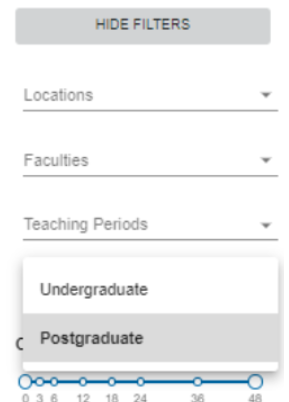
- I am unable to find an Undergraduate/Postgraduate unit.
Log into your Monplan. Kindly click Show Filters -> change unit level to Undergraduate/ Postgraduate and type the unit code you wish to add.